> ## Documentation Index
> Fetch the complete documentation index at: https://docs.byzantine.fi/llms.txt
> Use this file to discover all available pages before exploring further.
# Technical implementation
> How to make a deposit into a Byzantine vault.
Byzantine accepts both stablecoins and fiat deposits. Based on the deposit currency, the process differs slightly.
## Supported assets
Before constructing a deposit, call [`GET /v1/query/assets`](/api-reference/products/get-all-assets) to retrieve the list of tokens currently supported across Byzantine vaults.
Byzantine currently supports USDC and EURC stablecoins.
A deposit into a Byzantine vault proceeeds in the following steps:
1. Get the deposit payload for the user to sign with the authentication method used.
2. Submit the signed payload to execute the deposit transaction.
3. \[Optional - only for fiat deposits] User deposits fiat into a dedicated bank account to convert it to stablecoins, known as *on-ramping*.
4. Execute the deposit transaction to transfer the stablecoins into a Byzantine vault.
The integrator will have to call different API endpoints based on the authentication method used.
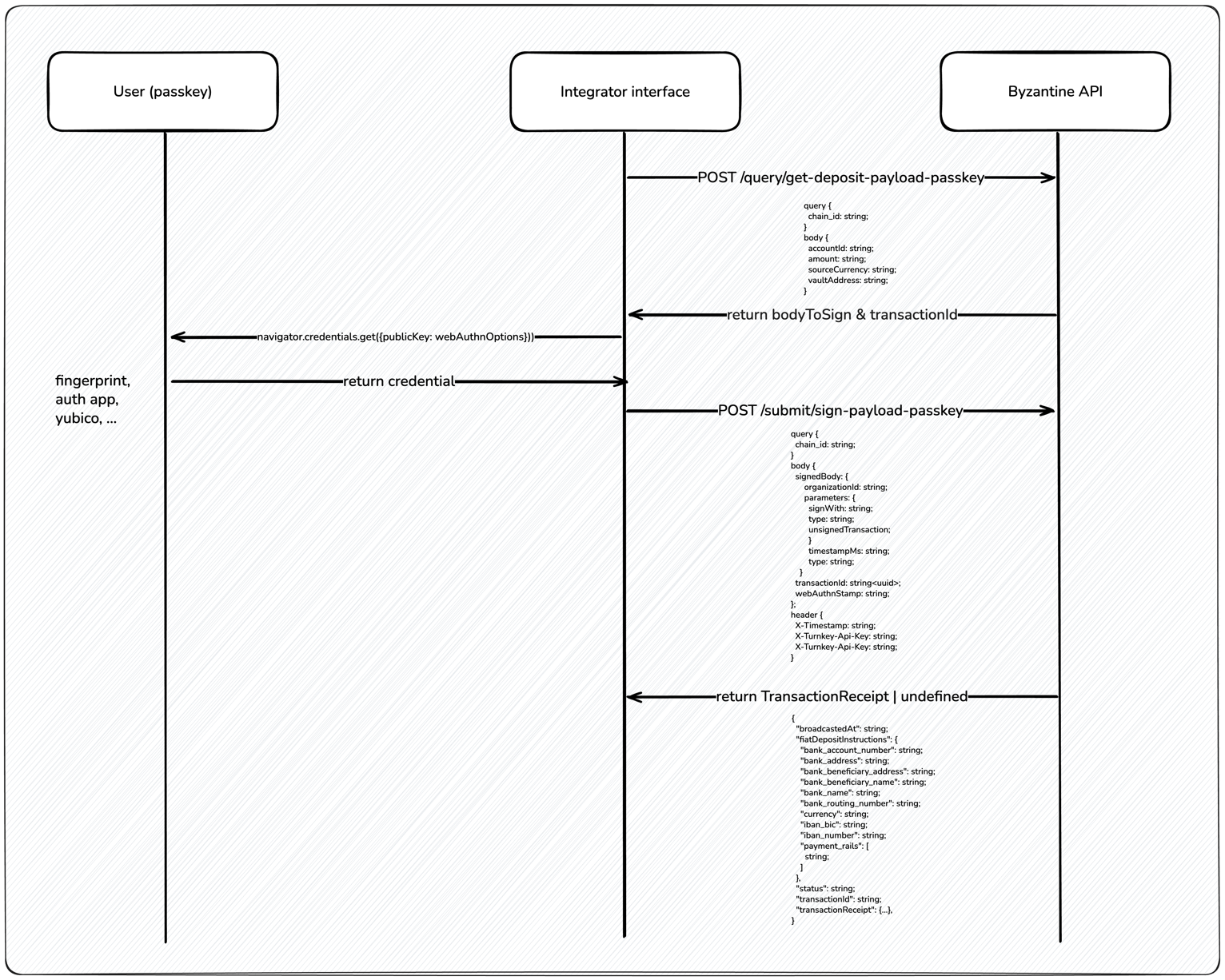
## 1. Signing the deposit transaction
Initiating the deposit is once again a two-step transaction.
1. [Get deposit payload](/api-reference/transactions/get-deposit-payload), which requests the transaction body to sign.
2. [Sign a payload (passkey)](/api-reference/transactions/sign-payload), which submits the signed transaction.
 ## 2. \[Optional] Depositing fiat into bank account (on-ramping)
On-ramping assets is done via [Bridge](https://www.bridge.xyz/), our on- and off-ramping partner.
A dedicated bank account is automatically created for each user based on their fiat currency and the vault's currency. Once the deposit transaction is signed, the bank account details are provided to the user.
The user must deposit fiat into this dedicated bank account to convert it to stablecoins. Any funds sent to the bank account are automatically converted into the vault's currency.
This step can be skipped if user is depositing stablecoins directly.
## 3. \[Automatic] Executing the deposit transaction
Once the deposit transaction is signed (step 2), the stablecoins will be transferred immediately into the Byzantine vault.
For users depositing stablecoins, the transaction is immediately broadcasted, i.e. the status is set to `completed`.
As soon as the on-ramping is complete, Byzantine will automatically execute the pre-signed transaction, which means user's money will be transferred into the Byzantine vault.
Note that signing the deposit transaction or depositing fiat into the bank account does not complete the deposit. Funds are only transferred into the Byzantine vault after on-ramping is complete.
## 2. \[Optional] Depositing fiat into bank account (on-ramping)
On-ramping assets is done via [Bridge](https://www.bridge.xyz/), our on- and off-ramping partner.
A dedicated bank account is automatically created for each user based on their fiat currency and the vault's currency. Once the deposit transaction is signed, the bank account details are provided to the user.
The user must deposit fiat into this dedicated bank account to convert it to stablecoins. Any funds sent to the bank account are automatically converted into the vault's currency.
This step can be skipped if user is depositing stablecoins directly.
## 3. \[Automatic] Executing the deposit transaction
Once the deposit transaction is signed (step 2), the stablecoins will be transferred immediately into the Byzantine vault.
For users depositing stablecoins, the transaction is immediately broadcasted, i.e. the status is set to `completed`.
As soon as the on-ramping is complete, Byzantine will automatically execute the pre-signed transaction, which means user's money will be transferred into the Byzantine vault.
Note that signing the deposit transaction or depositing fiat into the bank account does not complete the deposit. Funds are only transferred into the Byzantine vault after on-ramping is complete.